
To make a biodata for marriage, first write down the date and time of birth, then gather the job and family details. Then pick a design, fill the form in seven parts, add one passport-size photo and send it as an A4 PDF. Hello Biodata has 66 designs and prints in 12 Indian languages.
This page is for the parent who has been asked, "Please send the biodata", and wants to get it right the first time.
Biodata for Marriage
A biodata for marriage is a one or two page profile of the boy or girl, made by the family and sent to the other side before anyone meets. It has the personal details, the horoscope details, the family details and one photo.
The other family reads it on WhatsApp first. Then an uncle forwards it to the family astrologer, and someone prints it for the grandparents.
It is not a job resume. Nobody wants a career objective, a list of skills or a signature at the bottom.
A complete biodata has these parts, in this order:
- Name and photo
- Personal details (date of birth, height, education, job)
- Horoscope details (rasi, nakshatra, lagna), if your family follows horoscopes
- Family details (parents, siblings, native place)
- A short About Me
- Contact details
The same sections work for a son or a daughter. Only the photo and the About Me usually read differently.
Make the biodata only after the boy has completed 21 years and the girl 18 years. These are the minimum marriage ages in India under the Prohibition of Child Marriage Act, 2006, and section 5 of the Hindu Marriage Act, 1955 gives the same ages.
Details to Collect Before You Start
Keep these details ready in one place, because hunting for the birth time halfway through the form is how most mistakes happen.
| Detail | Where to find it |
|---|---|
| Date of Birth and Time of Birth | The horoscope written when the child was born, or the birth certificate |
| Place of Birth | The town or village, for example Kumbakonam, not only the district |
| Rasi, Nakshatra, Lagna | The horoscope. If you only have the birth time, the form works them out |
| Gotra | Elders on the father's side |
| Height | Measure it fresh (5 ft 6 in) |
| Education | Full degree name and college, for example B.Com, Madras Christian College |
| Job / Occupation | The designation, then the company and city |
| Family | Both parents' occupations, and each brother and sister (say who is married) |
| Native Place | The family's ancestral town |
| Mobile Number | One number that a parent will always answer |
Ask your son or daughter to check their own section. Children often know their exact designation better than their parents do.
How to Make Biodata for Marriage in 7 Steps
These steps follow the order of our form, so you can keep this page open on one phone and the form on another.
1. Pick a Design and a Language
Start with the design, because it decides how the page looks when the other family opens it. Some families want a traditional border with a temple feel. Others, especially for a son working in Bengaluru or abroad, choose a plain one.
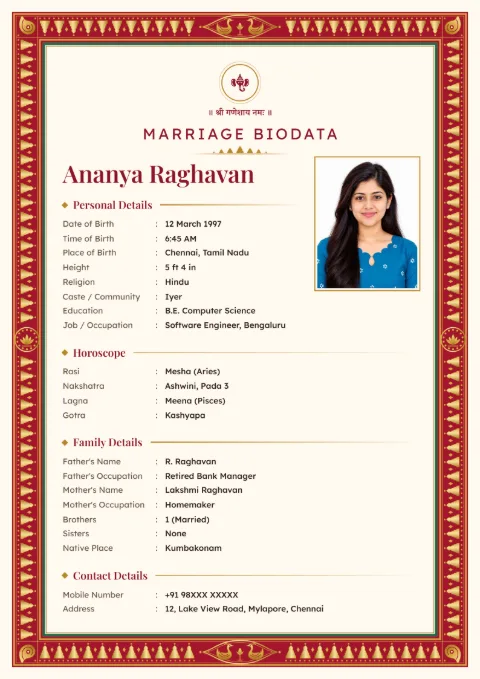
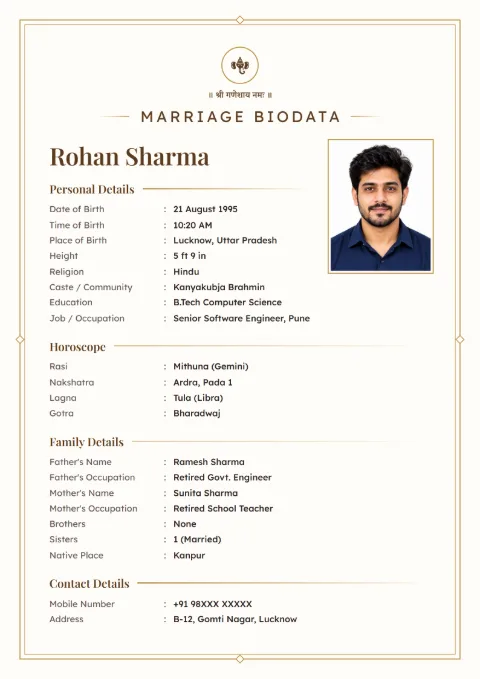
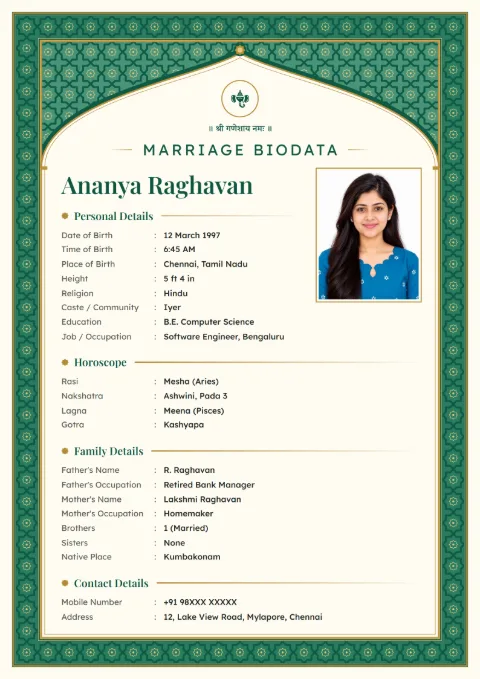
You can pick a design and fill in your details from the full set of 66. The biodata prints in English, Hindi, Tamil, Telugu, Kannada, Malayalam, Marathi, Gujarati, Bengali, Punjabi, Odia or Urdu.
After the design, the form asks "This Biodata Is For: Male / Female" and the Full Name. Then it sends a code by SMS to verify the mobile number, once.
2. Fill in the Personal Details
The first part asks for Full Name, Date of Birth, Time of Birth, Place of Birth, Height, Religion, Caste / Community, Education and Job / Occupation.
Write the name exactly as the family uses it. If he is known as "R. Karthik" in the family but "Karthikeyan Ramasamy" in his certificates, use the full form.
You can add more lines if you want them: Marital Status, Annual Income, Complexion, Blood Group, Diet, Languages Known and Hobbies. Every one of these is optional. Complexion in particular can be left out.
3. Add the Horoscope Details
The horoscope part has Rasi, Nakshatra, Lagna and Chevvai / Manglik. You can also add Gotra, Dasa at Birth and Tithi.
Rasi, nakshatra and lagna are worked out from the birth details you enter, using the sidereal zodiac and the Lahiri ayanamsa. If your family jothidar has written a different star, simply edit it.
Check the time of birth twice. A difference of even 15 to 20 minutes can change the lagna, and near a star change it can change the nakshatra too.
For Muslim and Christian biodatas, the horoscope does not print by default. Christian families can add Church / Parish instead.
4. Write Education, Job and Income Plainly
One line each is enough. "B.E. Mechanical, Anna University, 2019" tells the reader more than "Engineering graduate".
For the job, write the designation and the company, then the city: "Senior Analyst, Infosys, Mysuru". If he runs the family rice mill in Thanjavur, write that.
Income is optional. If you add it, give the yearly figure, for example ₹9,60,000 a year or 9.6 lakh a year, and do not mix monthly and yearly figures.
5. Fill in the Family Details
This part asks for Father's Name, Father's Occupation, Mother's Name, Mother's Occupation, Brothers, Sisters and Native Place.
For brothers and sisters, say who is married. "1 elder sister, married, settled in Coimbatore" answers three questions the other side would otherwise ask on the phone.
You can also add Family Type (joint or nuclear), Family Status, Maternal Uncle and Property. Many families in Tamil Nadu like to mention the maternal uncle (thai mama), so the option is there.
6. Write a Short About Me
About Me is three or four sentences in plain words. What the person does, what they like, and what kind of family life they hope for.
There is no separate field for partner expectations. If you want to mention them, add one line at the end of About Me, such as "Looking for a working girl from a Tamil family, open to moving to Pune."
Keep it honest. The other family will meet the person, and anything that sounds too polished will come up at that first meeting anyway.
7. Add the Photo, Check and Download
Every design has one passport-size photo box. Upload a recent, clear photo taken in daylight, crop it to the face and shoulders, or leave the photo out.
Then open the preview and read every line aloud, slowly. Check the spelling of the father's name and the star most of all. Then the mobile number.
Download it as a PDF (A4, for printing) or as one JPG image that holds every page in one picture, which is easy to forward on WhatsApp. A free download prints a small line, "Made free at hellobiodata.com", at the foot of the page. Our page on how to make your biodata as a PDF has tips on printing it well.
The biodata is saved on your mobile number. If his job changes next year, open it again and edit the one line.
Making a Biodata on Mobile, in Word or Online
All three ways work. The difference is how much layout work you do yourself.
| Method | Good for | Watch for |
|---|---|---|
| Word file on a laptop | Full control over every line | Lines shift when the file opens on another phone, and the photo often moves |
| A design app on the phone | Many decorative layouts | You type every field into separate boxes and line them up by hand |
| An online biodata maker | You fill a form and the design is applied for you | You may need to verify your mobile number first |
If you send a Word file, convert it to PDF before sending. A PDF looks the same on every phone.
For a ready layout with every section in place, see our marriage biodata format with field names. A filled marriage biodata sample for a boy and a girl is on a separate page.
What to Leave Out of the Biodata
Some details do not belong in a document that may pass through 20 phones in a week.
- Aadhaar number, PAN and bank details
- Salary slips or exact take-home pay
- The full house address, if you are sending it widely (Current City is enough at first)
- Photos more than a year or two old
Once a proposal moves ahead, share the rest directly with that one family. Our list of questions families ask before an arranged marriage covers what usually comes up next.
More guides on biodata formats and wording are in marriage biodata basics.
Common questions
How Many Pages Should a Marriage Biodata Be?
One page is best, two at most. If it runs to three pages, shorten the About Me and remove the optional lines nobody asked for.
Should the About Me Be in First Person or Third Person?
Either is fine, but keep to one. If the boy or girl writes it, "I work as" sounds natural. If the parents write it, "She works as" reads better.
Can I Make the Same Biodata in Two Languages?
Yes. Many families send a Tamil or Telugu biodata to the grandparents' side and an English one to relatives abroad. Open the saved biodata, change the language and download again.
Is a Photo Compulsory?
No. Every design has a photo box, but you can leave it empty and send the photo separately only to families you are serious about.
Can I Edit the Biodata After Downloading It?
Yes. Log in with the same mobile number, open the biodata, change what you need and download the new copy. Delete the old file from your phone so you do not send it by mistake.
Sources
Related Guides
Still at the Biodata Stage?
Pick a design, fill in your details and download your biodata as a PDF or an image.